
Muin for Finance: Complete Guide to AI-Powered Accounting Operations
A comprehensive guide to using Muin's Finance module for invoice processing, expense management, cash flow tracking, and accounting automation.

Names and scenarios in this article are illustrative, not real customer stories. They represent common patterns we hear from finance teams at growing businesses.
Here’s the paradox: small businesses need enterprise-level controls and visibility, but they don’t have enterprise-level resources. One person might handle AP, AR, expenses, and financial reporting—while also fielding questions from every department. Enterprise finance software exists, but it requires dedicated teams to operate. SMBs need the same capabilities without the complexity.
“Finance teams spend a substantial share of their time gathering, validating, and formatting data — a pattern the Association for Financial Professionals (AFP) has documented across multiple annual surveys, with survey figures commonly falling in the 50-75% range depending on team size and tooling maturity.”
That’s who we designed this module for.
The good news: the technology is finally accessible. According to Ardent Partners research, the average organization spends approximately $9–10 to process a single invoice, while best-in-class teams have reduced that to under $3 through automation. And McKinsey’s 2020 Global Survey on automation found that two-thirds of organizations were at least piloting automation technologies—up from 57% in prior surveys—a trend that has only accelerated since.
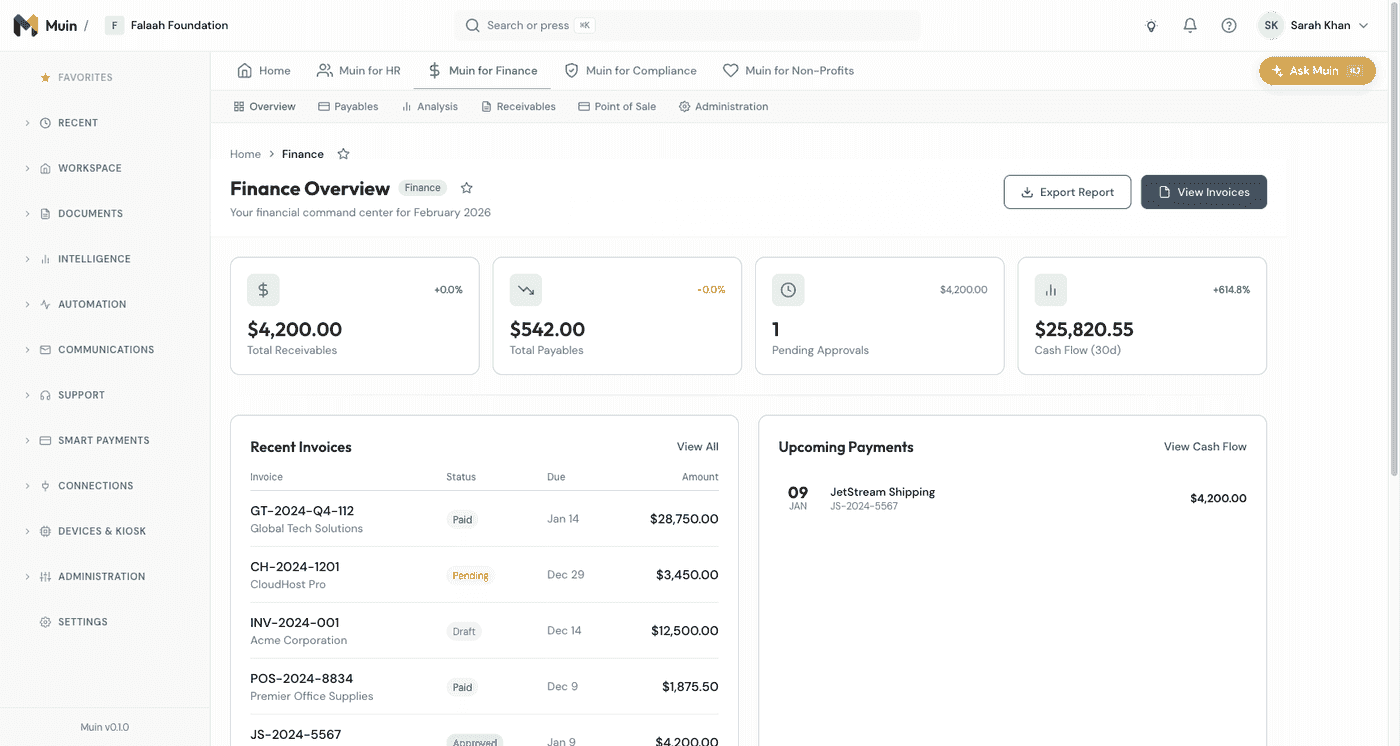
Muin for Finance changes the equation. AI handles the tedious processing work, freeing you for analysis, strategy, and the relationship management that actually moves your business forward.
Consider Nicole. She processes 47 invoices a month for a growing professional services firm. Most of them are routine — same vendors, predictable amounts, standard terms. With Muin, she touches 3 — the ones that actually need her judgment. The rest flow through extraction, matching, approval, and payment automatically. Nicole didn’t get into finance to do data entry. Now she doesn’t have to.
What Muin for Finance Does
The Finance module addresses four core areas:
| Capability | What It Does | Key Benefit |
|---|---|---|
| Invoice Management | From receipt to payment — AI extraction, duplicate detection, 3-way matching, approval workflows | Process invoices in seconds, not minutes |
| Expense Management | From receipt to reimbursement — receipt scanning, policy enforcement, approval routing | Same-day expense report turnaround |
| Cash Flow | Visibility and forecasting — real-time dashboards, projections, alerts | Never be surprised by a cash crunch |
| Tax Organization | Year-round preparation — document categorization, deduction tracking, 1099 management | Tax season stops being a scramble |
Let’s explore each in detail.
Invoice Management
Here’s how Muin processes your financial documents:
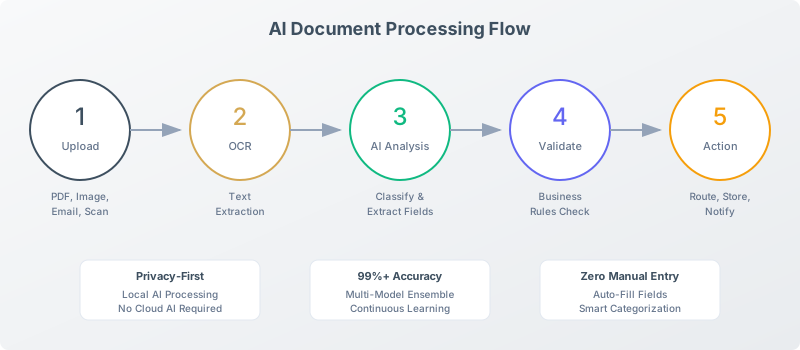
AI-Powered Extraction
Upload an invoice and Muin’s AI extracts:
- Header data: Vendor, invoice number, date, due date
- Line items: Description, quantity, unit price, total
- Summary: Subtotal, tax, discounts, grand total
- Terms: Payment terms, early pay discounts
Accuracy: High accuracy for standard invoice formats, with configurable extraction rules. Multi-page and scanned invoices supported. Handwritten text extraction — Coming Soon.
Processing time: Typically under 10 seconds per invoice.
Duplicate Detection
Before an invoice enters your system, Muin checks for:
- Same invoice number from same vendor
- Similar amount + date combinations
- Near-duplicate line items
Protection: Prevent paying the same invoice twice—a common and costly mistake.
3-Way Matching
For invoices tied to purchase orders:
Invoice ← → Purchase Order ← → Receipt/DeliveryMuin automatically:
- Link invoice to PO by number or vendor
- Compare line items and amounts
- Verify goods/services were received
- Flag discrepancies for review
Match status:
- ✅ Perfect match: Proceed to approval
- ⚠️ Within tolerance: Approve with note
- ❌ Significant variance: Hold for review
Approval Workflows
Configure approval routing based on:
- Amount: Under $500 auto-approve, $500-5K manager, $5K+ director
- Vendor: Trusted vendors get streamlined approval
- GL category: Certain codes require specific approvers
- Department: Route to department head first
Approval actions:
- Approve
- Reject with reason
- Request more information
- Delegate to another approver
Status Tracking
Every invoice has a clear status:
| Status | Meaning |
|---|---|
| Received | Uploaded, extraction complete |
| Pending Approval | Waiting for approver action |
| Approved | Ready for payment |
| Scheduled | Payment date set |
| Paid | Payment executed |
| Rejected | Declined with reason |
| On Hold | Suspended pending resolution |
Dashboard shows real-time status across all invoices.
GL Coding
Assign GL codes to invoices manually or let AI assist:
Manual coding:
- Select GL codes from your chart of accounts
- Apply to full invoice or line items
AI-Assisted Coding
- AI suggests GL codes based on vendor, description, and history
- High-confidence suggestions applied automatically
- Low-confidence flagged for human decision
Split Coding (Coming Soon)
- Allocate invoice across multiple codes
- Allocate across departments or projects
- Track allocations for reporting
Integration with Accounting Software
Approved invoices sync to:
- QuickBooks Online
- Xero (coming soon)
- Sage (coming soon)
- NetSuite (coming soon)
Sync includes:
- All invoice data
- GL coding
- Approval audit trail
- Attachments
Expense Management
Receipt Capture
Multiple ways to get receipts into Muin:
Drag and drop:
- Desktop upload
- Batch multiple receipts
Mobile upload (Coming Soon)
- Snap photo with phone
- Receipts processed immediately
Email forwarding (Coming Soon)
- Forward receipts to expenses@yourcompany.muin-docs.falaah.ai
- Auto-extracted and attributed
Corporate Card Integration (Coming Soon)
- Connect corporate cards
- Import from bank feeds
AI Extraction
From each receipt, Muin extracts:
- Merchant name
- Date
- Amount
- Payment method
- Tax (where applicable)
Automatic Categorization
Muin categorizes expenses:
| Category | Examples |
|---|---|
| Travel - Airfare | United, Delta, Southwest |
| Travel - Hotel | Marriott, Hilton, Airbnb |
| Travel - Ground | Uber, Lyft, Enterprise |
| Meals - Client | Restaurants with “client” note |
| Meals - Team | Team lunch, events |
| Meals - Individual | Solo meals while traveling |
| Software | SaaS subscriptions |
| Office Supplies | Amazon, Staples |
| Professional Services | Legal, accounting, consulting |
Categories are configurable to match your chart of accounts.
Policy Compliance (Coming Soon)
Set expense policies and Muin enforces them:
Limits:
- Per-expense limits by category
- Daily limits for travel
- Per-diem for meals
Requirements:
- Receipts required over $X
- Business purpose required
- Client/project attribution
Violations:
- Auto-flag policy violations
- Require justification
- Escalate to manager
Expense Reports
Employees submit expenses via:
- Individual receipts → Create report
- Batch submission → All at once
- Automatic reports → Monthly compilation
Report contents:
- All receipts with details
- Categories and coding
- Policy compliance status
- Total for reimbursement
Reimbursement Tracking (Coming Soon)
After approval:
- Mark scheduled for payment
- Record payment date and method
- Track outstanding advances
- Report on reimbursement timing
Cash Flow
Dashboard Overview
See your cash position at a glance:
Current State:
- Cash on hand (all accounts)
- Accounts receivable
- Accounts payable
- Net position
Trend:
- 30/60/90 day view
- Week-over-week change
- Month-over-month change
Forecasting
Project forward based on:
- Scheduled payments (AP)
- Expected receipts (AR)
- Recurring expenses
- Historical patterns
Scenarios:
- Best case (everything on time)
- Expected case (historical patterns)
- Worst case (delays + unexpected)
Alerts
Set up automatic alerts:
Low cash warning:
- Threshold: $X in account
- Action: Alert finance team
Large payment due:
- Threshold: Payment over $X
- Timing: 5 days before
- Action: Alert and verify funds
Cash flow projection negative:
- Trigger: Forecast shows shortfall
- Action: Alert with days until issue
Bank Account Integration
Connect bank accounts for real-time balances:
- Read-only connection
- Secure OAuth
- Supported: Most major banks
Tax Organization
Document Categorization
Muin organizes documents by tax relevance:
Income documentation:
- Revenue records
- 1099s received
Expense documentation:
- Deductible expenses
- Receipts for claims
Compliance documentation:
- Payroll records
- Sales tax collected
Year-End Export
Generate accountant-ready packages:
Export includes:
- All invoices with receipts
- Expense summaries by category
- Vendor payments (1099 candidates)
- Missing documentation report
Formats:
- PDF compilation
- CSV data export
- Direct share with accountant
1099 Preparation
For vendors requiring 1099s:
Tracking:
- Flag vendors as 1099 eligible
- Track payments by vendor
- Alert for threshold approaching
Generation:
- List vendors over $600
- Export for 1099 filing
- W-9 collection tracking
Grant Tracking
For organizations managing grants:
Budget vs. Actual
Per-grant tracking:
- Budgeted amounts by category
- Actual spend to date
- Remaining budget
- Burn rate
Compliance Documentation
Grant-specific requirements:
- Document retention
- Audit trail
- Expense allocation accuracy
- Reporting period tracking
Grant Reporting
Generate funder reports:
- Expense by grant category
- Supporting documentation
- Compliance attestation
Integration with Accounting Software
QuickBooks Online
Sync to QBO:
- Approved invoices → Bills
- Approved expenses → Expenses
- Vendor data → QBO Vendors
Sync from QBO:
- Chart of accounts
- Existing vendors
- Bank balances
Setup: 5-minute OAuth connection
Xero (Coming Soon)
Sync to Xero:
- Approved invoices → Bills
- Approved expenses → Expenses
- Contact updates
Sync from Xero:
- Contacts
- Accounts
- Tax rates
Setup: 5-minute OAuth connection
Best Practices
Setting Up Approval Workflows
Start conservative:
- Lower thresholds initially
- Increase as confidence builds
Consider timing:
- Urgent items need fast routing
- Regular items can batch for daily review
Plan for absence:
- Configure backup approvers
- Set escalation timelines
Configuring Categories
Match your chart of accounts:
- Expense categories → GL codes
- Consistent mapping reduces errors
Be specific enough:
- “Marketing” is too broad
- “Marketing - Advertising” is better
Not too specific:
- If category has fewer than 5 transactions/year, consolidate
Training the AI
Muin adapts to your corrections:
When AI codes incorrectly:
- Correct it
- AI adjusts for future
- Similar items coded correctly
When AI misses data:
- Add the missing data
- Flag the receipt type
- Improvements deployed
Reconciliation Routine
Daily:
- Review flagged items
- Approve pending invoices
- Check failed syncs
Weekly:
- Clear approval queue
- Review expense reports
- Check cash flow projection
Monthly:
- Full reconciliation
- Vendor statement comparison
- Expense category review
David used to spend the first week of every month closing books. Chasing down missing receipts, reconciling bank statements against the AP ledger, verifying that every payment matched an approved invoice. With Muin handling extraction, matching, and reconciliation continuously, month-end close takes two days. The data is already clean because it was processed correctly the first time.
Results We’re Building Toward
Our platform goals for finance operations:
| Metric | Typical | Target* |
|---|---|---|
| Invoice processing time | 15 min each | 30 seconds |
| Expense report turnaround | 5 days | Same day |
| Late payment rate | 8% | Under 1% |
| Duplicate payment rate | 2% | 0% |
| Finance team overtime | Common | Rare |
These are design targets based on our platform architecture, not guaranteed outcomes. Actual results will vary based on your specific workflows and adoption.
Smart Payments Integration
Muin for Finance is not just an accounting tool — it is an integrated financial operations platform. Finance doesn’t end at approval. Once an invoice is approved, someone still has to make the payment, record it, and reconcile the books. That’s where Muin’s Smart Payments picks up.
Imagine running a small consulting firm and sending your first invoice from Muin 20 minutes after signing up. You add your client, create the invoice, and attach a payment link. Your client pays directly from the email, and the payment records itself in your books without you lifting a finger. That is what integrated payments can look like.
When you approve an invoice in the Finance module, Smart Payments can handle the rest automatically. Accept payments on outgoing invoices via card or ACH through Stripe — customers pay directly from a payment link, and the transaction records itself. For inbound invoices, schedule payments to vendors and watch the status update in real time across both modules.
The real value is in reconciliation. Payments processed through Smart Payments are matched to their invoice automatically whenever the match is confident, and anything ambiguous is queued for a quick human confirmation instead of being guessed at. No more end-of-month scrambles comparing bank statements to your AP ledger. The matching happens as payments clear, so your books stay current without manual effort.
For organizations that handle recurring payments—subscription billing, monthly retainers, grant disbursements—Smart Payments automates the cycle. Set up the schedule once, and each cycle comes due on time with proper documentation attached; disbursements pass through your approval step before the money moves, so a scheduled payout is never a surprise. Failed payments trigger alerts and retry logic, so nothing falls through the cracks.
Get Started
If you’re tired of manual data entry and chasing paper, start your free trial. You’ll be able to process your first invoice in minutes and see if this approach fits your workflow.
The best way to evaluate finance software is to throw real documents at it. See how it handles your messiest invoice. That’ll tell you more than any demo.
Related Reading
- Customer Invoices documentation — Set up invoicing, approvals, and payment links
- Muin for HR — Compliance, onboarding, and certification tracking
- Muin for Compliance — Framework management and audit readiness
- AI Invoice Extraction — How Muin reads invoices automatically
- Introducing Muin — AI-powered business automation for SMBs
- Why Privacy-First AI Matters — How we protect your financial data
Part of our Module Deep-Dive Series. Next up: Muin for HR