
Muin for HR: Automate Compliance, Onboarding, and Certifications
A comprehensive guide to using Muin's HR module for employee management, compliance tracking, certification monitoring, and onboarding automation.

Names and scenarios in this article are illustrative, not real customer stories. They represent common patterns we hear from HR teams at growing businesses.
HR at a small business is a juggling act that nobody designed on purpose. You’re responsible for compliance without a compliance officer. You handle onboarding without a dedicated coordinator. You track certifications, benefits, and policies—often in spreadsheets that haven’t been updated in months because who has time?
The challenge is real: 57% of HR professionals report working beyond normal capacity due to understaffing, and 69% of organizations find regulations too complex or struggle to verify compliance. Yet the vast majority of companies use learning management systems for compliance training—proving that automation works when it’s accessible.
What actually matters here is simple: don’t let things slip through the cracks. An expired certification isn’t just paperwork — it’s liability exposure, lost contracts, regulatory headaches. The HR module exists to make sure you catch these things before they become problems.
Maria knows this firsthand. She handles HR for a company with offices in three states. Last year, she discovered that California employment law had changed 6 months ago — and her employee handbook still referenced the old rules. Nobody flagged it. No system caught it. She found out because an employee asked a question she couldn’t answer. That is the kind of gap Muin is designed to close before it becomes a liability.
The payoff is substantial: automated onboarding can reduce time-to-productivity by up to 50% based on industry research, and 70% of compliance leaders believe AI will transform their function within the next five years.
Muin for HR brings order to this chaos by putting AI to work on the monitoring and tracking, so you can focus on the human parts of human resources.
What Muin for HR Does
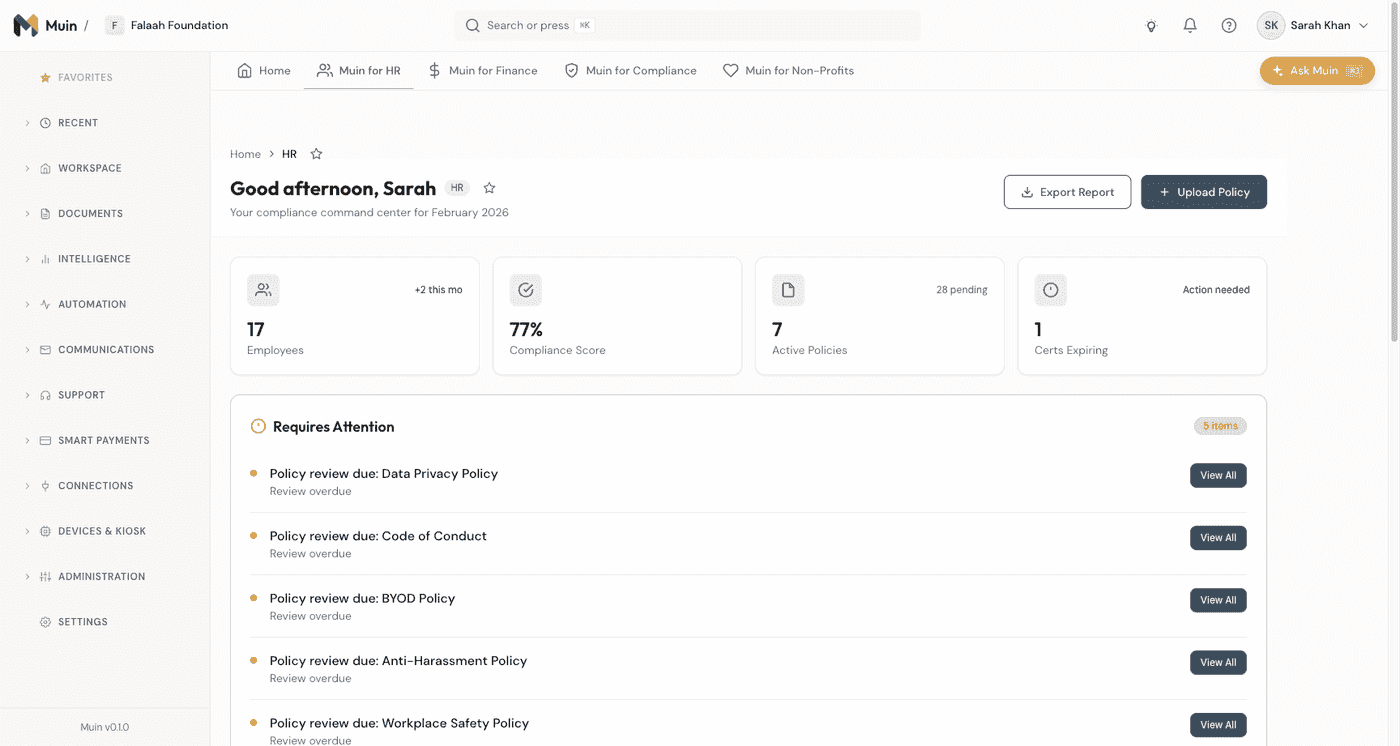
The HR module focuses on five core areas:
| Capability | What It Does | Key Benefit |
|---|---|---|
| Employee Management | Central directory, profiles, org structure, self-service | Single source of truth for all employee data |
| Onboarding Automation | Task checklists, document collection, IT provisioning, welcome flows | Consistent experience, nothing falls through the cracks |
| Time & Attendance | Clock in/out, breaks, geofencing, class attendance | Accurate hours that flow straight into payroll |
| Certification Tracking | Expiration monitoring, renewal alerts, compliance dashboards | Never miss a certification deadline again |
| Compliance Management | Policies, acknowledgments, multi-state tracking, reporting | Stay ahead of regulatory changes across states |
Employee Management
Central Directory
All employee information in one place:
Basic Information:
- Name, contact details, emergency contacts
- Employee ID, start date, department
- Manager, location, employment type
Employment Details:
- Position, title, job description
- Compensation (access controlled)
- Employment history at company
Document Storage:
- Offer letters and contracts
- Certifications and licenses
- Training records
Organization Structure
Visualize your organization:
- Org chart view
- Filter by department, location, function
- See reporting relationships
- Identify spans of control
Use cases:
- Approval routing based on hierarchy
- Department-level reporting
- Capacity planning
Profile Management
Manager/report relationships are supported for approval routing.
Employee Self-Service
- Contact information
- Emergency contacts
- Profile photo
- Notification preferences
HR manages:
- Employment information
- Access permissions
- Compliance requirements
- Compensation (restricted access)
Integration with HR Systems
Payroll register import (Available Now):
- Import a completed payroll register from any provider — ADP, QuickBooks, or CSV
- Automatic GL posting (wages, employer taxes, benefits) and bank-feed reconciliation
- Labor cost allocated by program, fund, and department for grant reports
- Learn more about the Payroll Operations Layer
Direct HRIS sync (Planned):
- ADP Workforce Now
- BambooHR
- Paylocity
- Rippling
Onboarding Automation
Task Checklists
Every new hire gets a consistent experience:
Pre-Start Tasks:
- Equipment order submitted
- Workstation prepared
- Email account created
- System access provisioned
- Parking/badge arranged
- Welcome email sent
Day One Tasks:
- Welcome meeting with manager
- HR orientation scheduled
- Benefits overview
- Policy acknowledgments
- Introductions to team
- Systems training
First Week Tasks:
- Complete required training
- Set up direct deposit
- Review emergency procedures
- Complete I-9 verification
- Schedule 30-day check-in
First Month Tasks:
- Complete all compliance training
- 30-day manager check-in
- Team integration activities
- Role-specific certifications
Automated Workflows
Onboarding triggers automated actions:
When new hire record created:
- Generate task checklist
- Assign tasks to responsible parties
- Send welcome email to new hire
- Notify manager of pending tasks
- Schedule orientation sessions
When task completed:
- Update progress tracker
- Notify next responsible party
- Update compliance status
When task overdue:
- Send reminder to assignee
- Escalate to manager after X days
- Alert HR for intervention
Document Collection
Collect required documents through the self-service onboarding portal:
Required Documents:
- Signed offer letter
- I-9 (Employment Eligibility)
- W-4 (Tax Withholding)
- Direct deposit form
- Emergency contact form
- Policy acknowledgments
- Benefits enrollment
Collection Process:
- New hire receives portal link
- Documents available for e-signature
- Uploaded documents AI-verified
- Missing items flagged and reminded
- Complete package stored in profile
Role-Based Customization
Different roles get different checklists:
| Role Type | Additional Items |
|---|---|
| Manager | Leadership training, team management setup |
| Developer | Code repository access, dev environment |
| Sales | CRM access, territory assignment |
| Finance | Financial system access, signing authority |
| Warehouse | Safety training, equipment certification |
Certification Tracking
Never miss an expiration. Muin tracks every certification across your team and alerts you well before renewal. Whether it is a CPA license, an OSHA safety cert, or a state-required harassment prevention training, the system knows when it expires and who needs to act. By the time you hear about it, there is still time to fix it — not a frantic scramble after the fact.
Certificate Management
Track all professional credentials:
Certification Types:
- Professional licenses (CPA, PE, RN, etc.)
- Industry certifications (PMP, AWS, Cisco)
- Safety certifications (OSHA, CPR, forklift)
- Required training (harassment prevention, ethics)
- Insurance and bonds
For Each Certification:
- Certificate document uploaded
- Expiration date (AI-extracted)
- Required for role (yes/no)
- Status (current, expiring, expired)
- Renewal process link
AI Extraction
Upload certificates and Muin extracts:
- Certificate type
- Issuing organization
- Issue date
- Expiration date
- Certificate number
Manual override: Review and correct any extraction errors directly in the UI.
Multi-Tier Alerts
Proactive expiration warnings:
| Timeline | Alert | Recipients |
|---|---|---|
| 30 days | Standard | Employee |
| 14 days | Important | Employee + Manager |
| 7 days | Urgent | Employee + Manager + HR |
| Expired | Critical | All stakeholders |
Alert content includes:
- What’s expiring
- Who’s affected
- Renewal process
- Business impact
- Action buttons
Compliance Dashboard
At-a-glance compliance view:
Status Grid:
- 🟢 Compliant: All certifications current
- 🟡 Attention: Something expires in 90 days
- 🟠 At Risk: Something expires in 30 days
- 🔴 Non-Compliant: Something expired
Filter by:
- Department
- Location
- Certification type
- Employee
- Expiration timeframe
Drill-down: Click any cell to see specific items and take action.
Renewal Management
Track the renewal process:
- Alert triggered — Notification sent
- Training scheduled — If required
- Training completed — Verified
- New certificate received — Uploaded
- Verified and updated — Status current
Workflow automation:
- Create renewal tasks automatically
- Track training enrollment
- Verify new certificates
- Update status on completion
Policy Management
Central Repository
All company policies in one place:
Policy Types:
- Employee handbook
- Code of conduct
- IT acceptable use
- Safety procedures
- Anti-harassment
- Remote work policy
- Travel and expense
- Confidentiality agreement
For Each Policy:
- Current version document
- Version history
- Effective date
- Next review date
- Required acknowledgment
Version Control
Manage policy updates:
- Upload new versions
- Archive old versions
- Track changes between versions
- Maintain full history
Acknowledgment Tracking
Ensure employees confirm receipt:
Acknowledgment Process:
- New policy published
- Employees notified
- Read and acknowledge electronically
- Signature recorded with timestamp
- Status tracked in dashboard
Tracking View:
- Who has acknowledged
- Who hasn’t
- Days since notification
- Reminder status
Reminders:
- Initial notification
- 3-day reminder
- 7-day reminder with escalation
- 14-day final notice to manager
Audit Trail
Complete records for compliance:
- Who signed what, when
- Which version they signed
- IP address and device
- Export for auditors
Compliance Dashboards
HR Health Score
Aggregate compliance measure:
Factors:
- % employees with current certifications
- % employees with all policy acknowledgments
- % onboarding tasks completed on time
- Document completeness score
Score Ranges:
- 90-100%: Excellent
- 80-89%: Good
- 70-79%: Needs attention
- Below 70%: Urgent action required
Regulatory Alerts
Stay ahead of requirements:
Monitoring:
- Federal regulation changes
- State-specific requirements
- Industry standards updates
Alerts Include:
- What changed
- How it affects you
- Action steps
- Deadline for compliance
Reports
Generate compliance reports:
Standard Reports:
- Certification status report
- Policy acknowledgment status
- Onboarding completion report
- Training compliance report
Custom Reports:
- Filter by any field
- Export to PDF or CSV
- Schedule recurring delivery
- Share with stakeholders
Time and Attendance
Hours are the raw material of payroll, and Muin captures them at the source rather than importing them from yet another app.
Clocking In and Out
Employees clock in and out from the web or their phone — no dedicated terminal required. Each entry records the clock-in time, the clock-out time, and break minutes, so a shift is fully accounted for.
- GPS-stamped punches. Mobile clock-ins capture a location stamp, so you can see where a punch happened.
- Geofencing. Punches made outside an allowed area can be flagged — in a soft warn mode or a hard enforce mode, depending on how strict you need to be.
- Buddy-punch photo. Optionally require a photo at clock-in to deter one employee punching in for another.
- Full audit trail. Every punch records who, when, where, and how — so a timesheet stands up to scrutiny.
Accurate timekeeping means accurate pay. Optional geofencing and a clock-in photo keep the record honest — so payroll reflects the hours actually worked, without anyone standing over a punch clock.
Class and Session Attendance
For organizations that run classes or programs — weekend schools, training cohorts, recurring sessions — Muin tracks attendance the same way it tracks shifts. Mark each student present or absent per session, and Muin maintains an attendance register plus per-student and per-program summaries. Instructors can assign badges to recognize milestones.
From Hours to Payroll
Clocked shifts and class-linked hours roll up automatically into monthly hours, tardy reports, and hours-by-program breakdowns. Those feed the timesheet build that flows into the Payroll Operations Layer below — attendance becomes labor cost without anyone re-keying a number.
Integration with HR Systems
Payroll Operations Layer (Available Now)
Muin owns the entire workflow around payroll and hands off only the regulated tax step to your existing provider. Run payroll where you always have — ADP, QuickBooks, or manually — then bring the register into Muin and every downstream step happens automatically. Nothing to replace, no payroll engine to embed.
Payroll operations:
- Import a completed payroll register from any provider (CSV upload, or one click on QuickBooks)
- Automatic GL posting (wages, employer taxes, benefits) and bank-feed reconciliation
- AI-powered pre-payroll audit checks before each run
- Labor cost by program, fund, and department — so your grant reports include staff costs
- Employee self-service paystubs in My Pay (web and mobile)
Frequency: Payroll registers are imported after each payroll run.
Future Integrations
Planned:
- ADP Workforce Now
- BambooHR
- Paylocity
- Rippling
Best Practices
Setting Up Certification Tracking
1. Inventory Requirements
- List all certifications required by role
- Identify compliance deadlines
- Note renewal processes
2. Upload Existing Certificates
- Batch upload for quick setup
- Review AI extractions
- Set up hierarchy
3. Configure Alerts
- Start with conservative timelines
- Adjust based on renewal lead times
- Set up escalation paths
Onboarding Optimization
1. Map Your Current Process
- Document all tasks
- Identify responsible parties
- Note common delays
2. Build in Muin
- Create checklist templates
- Assign task owners
- Set due date formulas
3. Test and Refine
- Onboard next hire through system
- Gather feedback
- Adjust and improve
Policy Management
1. Centralize Policies
- Upload all current policies
- Note version dates
- Identify required acknowledgments
2. Set Up Acknowledgment Workflows
- Determine which policies need signatures
- Configure reminder schedules
- Set escalation rules
3. Plan for Updates
- Annual review schedule
- Update process documented
- Re-acknowledgment triggers
Results We’re Building Toward
Our platform goals for HR compliance management:
| Metric | Typical | Target* |
|---|---|---|
| Certification lapses | 15%/year | Under 1%/year |
| Onboarding completion rate | 70% | 98% |
| Policy acknowledgment rate | 60% | 99% |
| HR admin time on tracking | 10 hrs/week | 2 hrs/week |
| Audit preparation time | 2 weeks | 2 days |
These are design targets based on our platform architecture, not guaranteed outcomes. Actual results will vary based on your specific workflows and adoption.
Get Started
If HR compliance keeps you up at night, try Muin. Upload a few certifications and see how the expiration tracking works. That’s the fastest way to know if this fits your needs.
The real question isn’t whether you can manage compliance manually—you probably can. The question is whether your time is better spent elsewhere.
Related Reading
- Muin for Compliance — Framework management, risk registers, and audit readiness
- Muin for Finance — AI-powered invoice processing and accounting
- The Payroll Operations Layer — Payroll GL posting, reconciliation, and labor-cost allocation without embedding a payroll engine
- Introducing Muin — AI-powered business automation for SMBs
Part of our Module Deep-Dive Series. Next up: Muin for Vendors