
Answer your website visitors from your own pages
AI Help Desk reads your website and answers visitor questions with a link to the source. When it does not know, it says so and passes the visitor to your team.
Everything AI Help Desk does runs in the Muin platform today.
Start a 30-day trialAI Help Desk will also be sold as a standalone product. Get one email when it opens.
Use it on: Web · WordPress. Where to get Muin

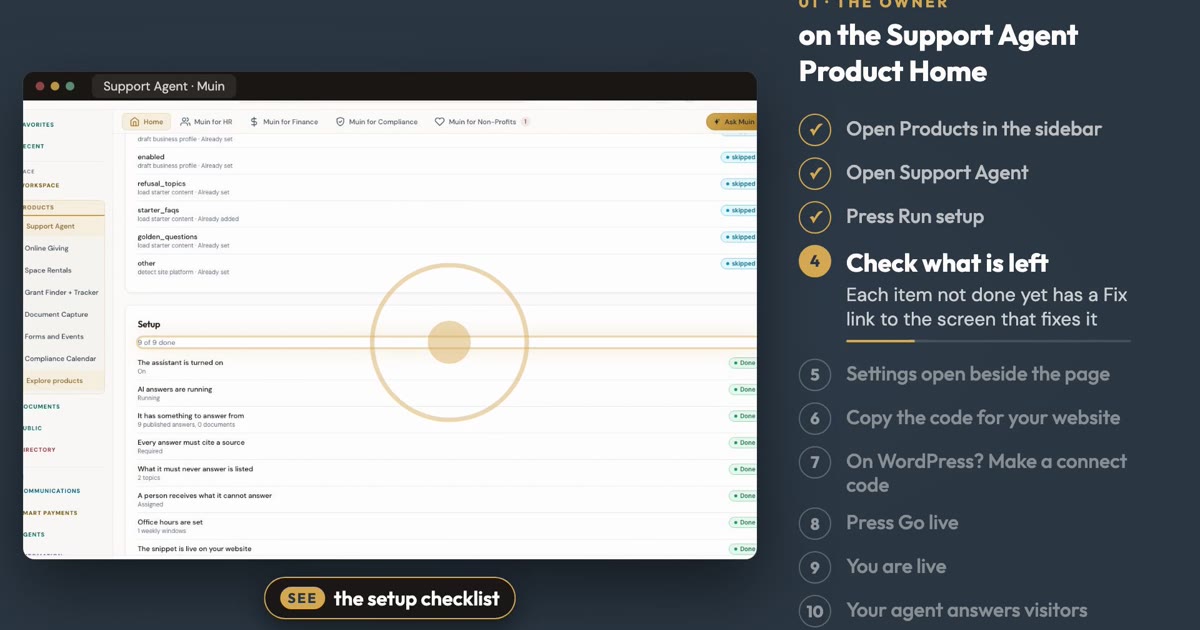
Watch it
AI Help Desk on the real app, in a few minutes.
What AI Help Desk includes
Includes
- Website answers from your own pages, with sources
- Support tickets and email intake
- Handoff to your team
Not included
- Answers on SMS and WhatsApp
- Support analytics and insights
- The staff Assistant
- Automations
Upgrade
A plan (Growth includes AI Help Desk)
How it works
Three steps, and Muin fills in most of each one for you.
Your website
Muin reads your website and drafts your business name, contact email and starter questions. You check what it found.
How it hands off
Choose who gets new questions and your office hours. Muin fills in sensible defaults to start from.
Put it on your site
Muin detects your site builder and gives you the snippet for it. Paste it, press Go live, and the assistant starts answering.
Who uses AI Help Desk, and for what
A clinic office manager
Patients ask the same questions after we close.
The assistant answers from your website and FAQs and links to its source. The Healthcare set declines diagnosis and medication advice.
A mosque administrator
People ask about programs, donations and hours all week.
Muin reads your website and answers from it. A question it cannot answer goes to the email you choose, within the office hours you set.
A partner at a professional services firm
We want inquiries answered without giving advice.
The Professional Services set declines legal or tax advice and fee quotes, and offers to pass the visitor to your team. New leads arrive by email.
What the AI does
Three jobs AI Help Desk does for you today. You check the result and decide.
Sets itself up from your website
Muin reads the website you give it and drafts your business name, contact email and starter questions for you to check.
Answers with a source
Each answer comes from your pages, documents or FAQs and links to where it came from. When they do not cover a question, it says so.
Checks every reply before it is sent
Replies are checked before they go out, so staff-only details stay private. Off-limits topics get a polite refusal and an offer to reach your team.
Answers from your own website
Muin reads the website you give it, including the pages it links to, and checks it again every week. Add documents and FAQs of your own on top.
A person takes over when needed
When the assistant is unsure, or a question is off-limits, it offers to pass the visitor to your team. New questions go to the email you choose, within the office hours you set.
A price that cannot run away
Each plan covers a set number of conversations a month. When you reach it, the assistant keeps answering from your published help articles and Muin emails you.
Everything in AI Help Desk
- Starter questions and off-limits topics for your type of business
- Wording that fits your visitors: customers, clients, members or parents
- Office hours and a named person for handoffs
- An optional short form before the chat, with a phone number and up to two questions of your own
- New leads by email, and to a webhook if you add one
- A usage meter that shows conversations used this month
- A readiness check before you go live, with a fix button for each gap
Works with
- WordPress
- Paste the snippet into your theme or a header plugin. The Muin WordPress plugin is not yet listed on WordPress.org.
- Wix, Squarespace and GoDaddy
- Muin detects your site builder and gives you the snippet for it.
- Any other website
- Anywhere you can paste a script tag.
- Webhooks
- Send each new lead to a webhook address you choose.
Start from a template
Pick your type of business and Muin loads starter questions and off-limits topics for it. Every set also answers your hours, how to reach a person and where you are.
Professional Services
Adds a free first consultation, how you charge and what to bring. Declines legal or tax advice, the status of a client matter and fee quotes.
Healthcare
Adds insurance accepted, new patients and what to bring. Declines diagnosis and medication advice and patient records, and points to 911 in an emergency.
Nonprofit
Adds how to donate, how to volunteer and who you serve. Declines details about a specific person you serve, a donor or a volunteer.
Built on the Muin platform
AI Help Desk runs on these Muin platform features by Falaah AI. Add another product later and it uses the same records, permissions and agents.
Security and trust
All customer data is stored in the United States, on DigitalOcean infrastructure in New York. AI processing runs on AWS Bedrock in US regions. Data does not leave the United States.
SOC 2 Type II
Preparation Underway
AICPA
GDPR
Designed For
EU Data Protection
PCI-DSS
Via Stripe (SAQ-A)
PCI Security Standards Council
US data residency
All customer data and AI processing
DigitalOcean and AWS
- Multi-factor sign-in
- Available
- SAML single sign-on
- Available on Enterprise
- Backups
- Daily, with 7-day point-in-time recovery
- Audit logs
- Activity kept 1 year, payments 7 years
Trust facts updated 2026-10-23.
Priced by conversations
Monthly, with no per-answer charge and no seat fees.
Free
50 conversations a month.
200 conversations
Or $190 a year.
1,000 conversations
Or $490 a year.
A new account starts with a 30-day trial of the 200 conversations plan. After the trial you stay on the Free plan unless you choose a paid one. No card needed to start. Past your monthly conversations, the assistant answers from your published articles until the next month starts.
Frequently asked questions
AI Help Desk is available on
Where you can use AI Help Desk. See every product.
-
Muin on the web
Available
-
Muin WordPress plugin
Available on request (plugin zip)
How to connect
With a Muin plan, also in: Muin (full connector) Available as a custom connector; muin Available.
Listings planned: Claude connector, Claude plugin, Plesk Extension, Wix App, WHMCS, Namecheap.
Get started with AI Help Desk
- Set up the AI Help Desk → Setup guide, step by step, with answers to common questions.
- How to set up the AI Help Desk, step by step →
- Comparing tools? AI Help Desk and Intercom Fin →
- Comparing tools? AI Help Desk and Tidio →
Answer your first visitor this week
Connect your website, choose who gets handoffs and paste one snippet.
Everything AI Help Desk does runs in the Muin platform today.
Start a 30-day trialAI Help Desk will also be sold as a standalone product. Get one email when it opens.