
Take donations online, with no monthly fee
Connect Stripe, publish a giving page Muin drafts for you, and put a donate button on your website. You pay card processing fees plus a 0.5% Muin platform fee per gift.
For a masjid: a zakat gift carries a zakat marker on its receipt and year-end statement, and zakat, sadaqah and fitrah can be kept apart. Muin for masjids
Everything Online Giving does runs in the Muin platform today.
Start a 30-day trialOnline Giving will also be sold as a standalone product. Get one email when it opens.
Use it on: Web · iOS and Android · WordPress. Where to get Muin

Watch it
Online Giving on the real app, in a few minutes.

What Online Giving includes
Includes
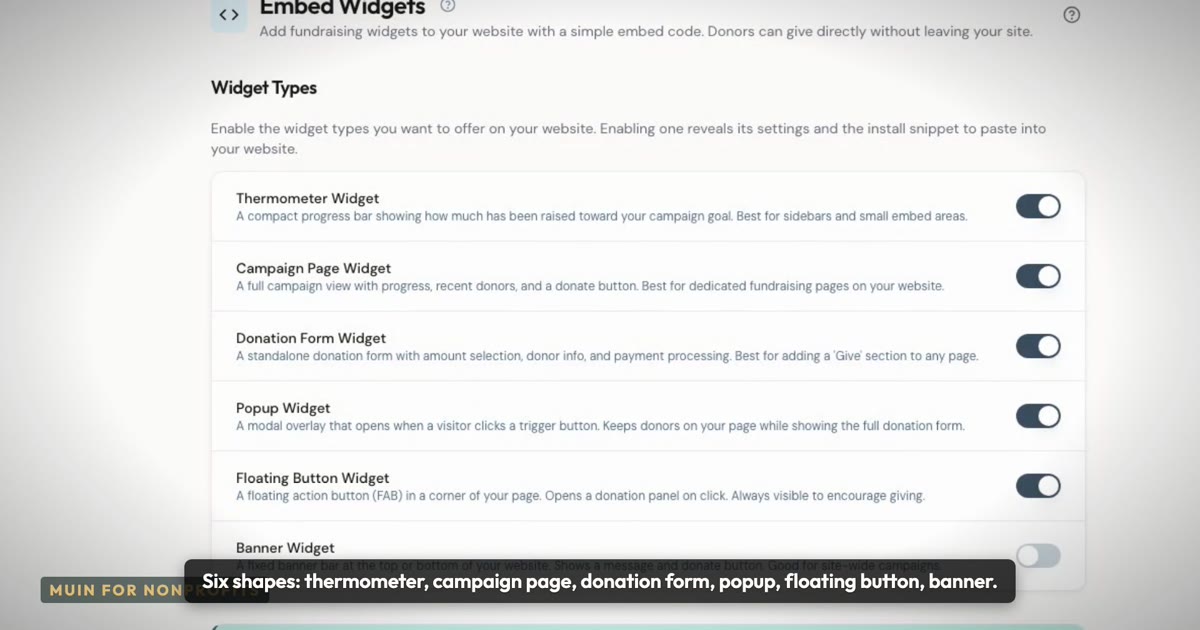
- Giving pages and donation forms with a donate button
- Impact tiers
- Recurring gifts
- Ramadan and last-ten-nights giving schedules
- Tap to Pay and kiosk giving
- Crypto, stock and DAF gifts through Every.org
- Zelle and check pledges
- ACH bank transfer
- Cash collection
- Employer matching
- QR codes
- Tax receipts and year-end statements
- Donor self-service
- Fund health
Not included
- Donor intelligence: donor profiles, next-best action, attribution
- AI targeted campaigns
- Peer-to-peer fundraising and appeals
- Anniversary and lapse automations
Upgrade
Starter with the Nonprofit module
Ways to give
Every channel below comes with Online Giving, for nonprofits, schools and places of worship.
Online
- Giving pages you build with your own amounts, the programs donors can choose, your branding and custom fields
- Donation forms built in Forms
- Impact tiers on a giving page that show what each amount does, such as feeding a family for a week
- One-time or recurring gifts, from daily to once a year
In person
- Tap to Pay on your phone with the Muin Go app
- A donation kiosk on a tablet
- A QR code for each giving page, to print or share
- Cash collections, recorded envelope by envelope
Other ways to pay
- Bank transfer (ACH) from a US bank account
- Crypto, stock and donor-advised fund (DAF) gifts through Every.org
- Zelle and check pledges
- Employer matching: donors name an employer that matches gifts, and you track each follow-up
After the gift
- A tax receipt by email after each gift
- A year-end statement for each donor
- A donor portal where donors see their gifts and receipts
- Donors pause or cancel a recurring gift themselves
How it works
Three steps, and Muin fills in most of each one for you.
Get paid
Muin starts your Stripe setup with the details you gave at signup. You finish it with Stripe so payouts reach your bank.
Your giving page
Muin drafts the page and starter causes for your type of organization. You check the words and publish.
Put it on your site
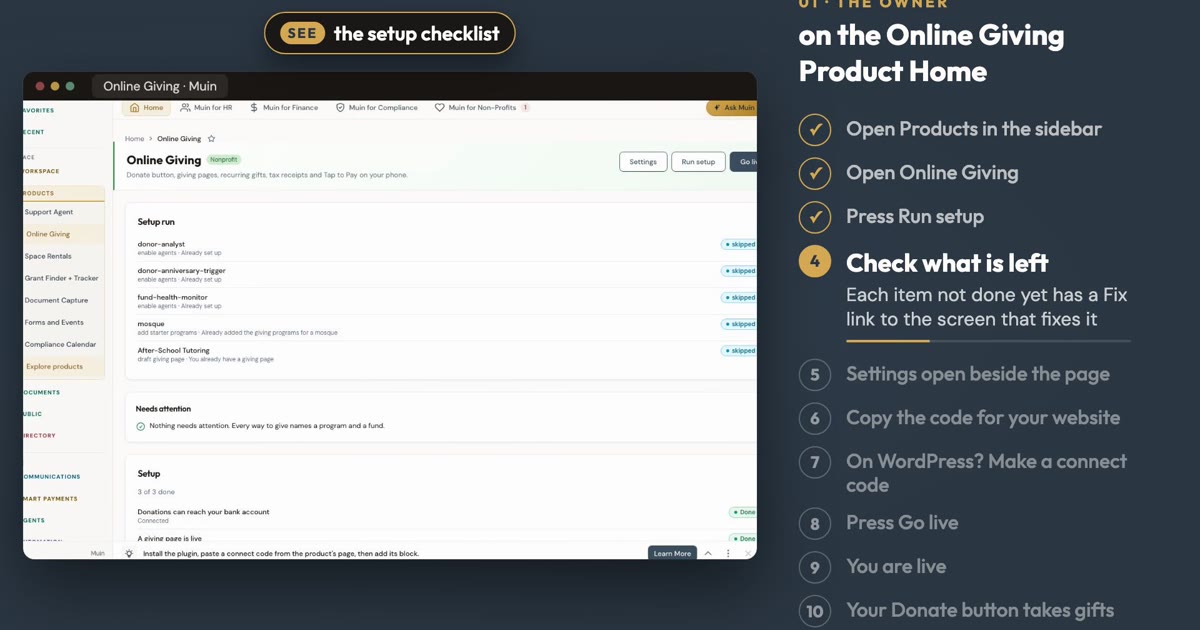
Copy the donate button onto your website or share the page link, then press Go live.
Built for organizations that raise money
- Mosques, churches and other places of worship
- Schools raising money for programs and building funds
- Food banks and community nonprofits
- Any organization that accepts donations
Who uses Online Giving, and for what
A mosque treasurer
We want members to give online every month.
Donors give once or every month on the same page, by card, bank, Apple Pay or Google Pay. Payouts reach your bank through your own Stripe account.
A church administrator
I need a giving page and we have no web designer.
Muin drafts the page from your website with your logo and starter causes. You edit the words and publish.
A food bank development director
Donors expect a receipt and a statement at year end.
Every donor gets a receipt. In January you review and send each donor a year-end statement.
A school fundraising lead
Parents want to give in person at our events.
Take a card gift on a phone with Tap to Pay in Muin Go.
What Muin does for you
Three jobs Online Giving does for you today. You check the result and decide.
Drafts your giving page
Muin starts your giving page from your website, with your logo and starter causes for your type of organization. You edit the words and publish.
Starts your Stripe setup
Muin starts your Stripe setup with the details you gave at signup. You finish it with Stripe so payouts reach your bank.
Checks you are ready
Before you go live, a readiness check lists what is left, with a fix button for each gap.
A giving page drafted for you
Donors give once or every month on the same page, by card, bank, Apple Pay or Google Pay, and can choose to cover the processing fee.
Works on a phone
The same page fits a donor’s phone, so a gift takes a minute wherever they are.

Receipts and year-end statements
Every donor gets a receipt. In January, review and send each donor a year-end statement.
Everything in Online Giving
- One-time and monthly gifts
- Card, bank, Apple Pay and Google Pay
- Donors can cover the processing fee
- Receipts, and year-end statements you review and send
- Tap to Pay on a phone with Muin Go
- Payouts to your own bank through your Stripe account
- Starter causes for mosques, churches, schools and food banks
- Giving volume and fees on your Online Giving page
Works with
- Stripe
- Your own Stripe account, so gifts are paid out to your bank.
- Muin Go
- Take a card gift in person with Tap to Pay.
- WordPress, Wix, Squarespace and GoDaddy
- Copy one donate button snippet onto your site. The Muin WordPress plugin is not yet listed on WordPress.org.
Start from a template
Start a page from a template instead of a blank screen.
Annual Giving Campaign
A year-round giving page for general donations, with impact stats and a donor FAQ.
Year-End / Holiday Giving
A seasonal appeal for the year-end giving window, with tax-deadline context.
Donation Form (Standalone)
A donation form with preset or custom amounts, fee coverage and fund designation.
Built on the Muin platform
Online Giving runs on these Muin platform features by Falaah AI. Add another product later and it uses the same records, permissions and agents.
Giving Pages
Branded donation, campaign, and event giving pages with progress tracking and recurring gifts.
About Giving PagesSmart Payments
Accept and send payments through cards, NFC, ACH, and more.
About Smart PaymentsMuin Go Mobile
One mobile app for payments, check-in, document capture, people, HR and more, with check-ins that keep working offline.
About Muin Go MobileSelf-Service Portals
Self-service portals for donors, members, parents, volunteers, grant applicants and your accountant.
About Self-Service PortalsSecurity and trust
All customer data is stored in the United States, on DigitalOcean infrastructure in New York. AI processing runs on AWS Bedrock in US regions. Data does not leave the United States.
SOC 2 Type II
Preparation Underway
AICPA
GDPR
Designed For
EU Data Protection
PCI-DSS
Via Stripe (SAQ-A)
PCI Security Standards Council
US data residency
All customer data and AI processing
DigitalOcean and AWS
- Multi-factor sign-in
- Available
- SAML single sign-on
- Available on Enterprise
- Backups
- Daily, with 7-day point-in-time recovery
- Audit logs
- Activity kept 1 year, payments 7 years
Trust facts updated 2026-10-23.
$0 a month, processing fees plus 0.5% per gift
Fees are taken from each gift. Donors can choose to cover them.
Processing fees plus 0.5% per gift
- Muin platform fee
- 0.5% (max $5 on ACH)
- Card processing (Stripe)
- 2.9% + $0.30 (2.2% + $0.30 for approved nonprofits)
- ACH bank transfer (Stripe)
- 0.8% (max $5)
Frequently asked questions
Online Giving is available on
Where you can use Online Giving. See every product.
-
Muin on the web
Available
-
Muin Go (iOS and Android)
Available
Learn more -
Muin WordPress plugin
Available on request (plugin zip)
How to connect
With a Muin plan, also in: Muin (full connector) Available as a custom connector; muin Available.
Listings planned: Claude connector, Claude plugin, TechSoup, Planning Center.
Get started with Online Giving
- Set up Online Giving → Setup guide, step by step, with answers to common questions.
- How to set up Online Giving, step by step →
- Comparing tools? Online Giving, Tithe.ly and Givebutter →
Take your first online gift this week
Connect Stripe, publish your giving page and put the donate button on your site.
Everything Online Giving does runs in the Muin platform today.
Start a 30-day trialOnline Giving will also be sold as a standalone product. Get one email when it opens.