
Document Intelligence: The Complete Lifecycle
AI-powered document intelligence transforms how SMBs handle documents. Read, extract, organize, search, and create—all in one platform.

Studies suggest that knowledge workers may spend up to 30% of their time searching for, organizing, and creating documents. For SMBs without enterprise-scale document management teams, this translates to thousands of hours annually lost to administrative work that doesn’t move the business forward.
The problem isn’t just storage. You have documents scattered across email attachments, cloud drives, file servers, and various business systems. Finding what you need takes forever. Understanding what’s in those documents takes even longer. And creating new documents from scratch? That’s where the real time sink begins.
Document intelligence changes this equation entirely. It’s not about having another place to store files—it’s about having AI that actually understands your documents and works with them the way you do.
What Is Document Intelligence?
Traditional document management is passive: upload a file, tag it, search for it later. Document intelligence is active. AI reads your documents, extracts meaningful information, organizes it intelligently, answers questions about it, and—here’s the breakthrough—helps you create new documents from everything it knows.
Think of it as the difference between a filing cabinet and an assistant who has read every document in your organization and can recall any detail instantly.
The complete document intelligence lifecycle has six stages:
- Ingest — Documents enter the system from any source
- Extract — AI reads and pulls out structured information
- Organize — Auto-categorization and smart tagging
- Retrieve — Natural language search and Q&A
- Create — AI-powered document assembly
- Export — Professional output in any format
Let’s walk through each stage.
Stage 1: Read & Extract
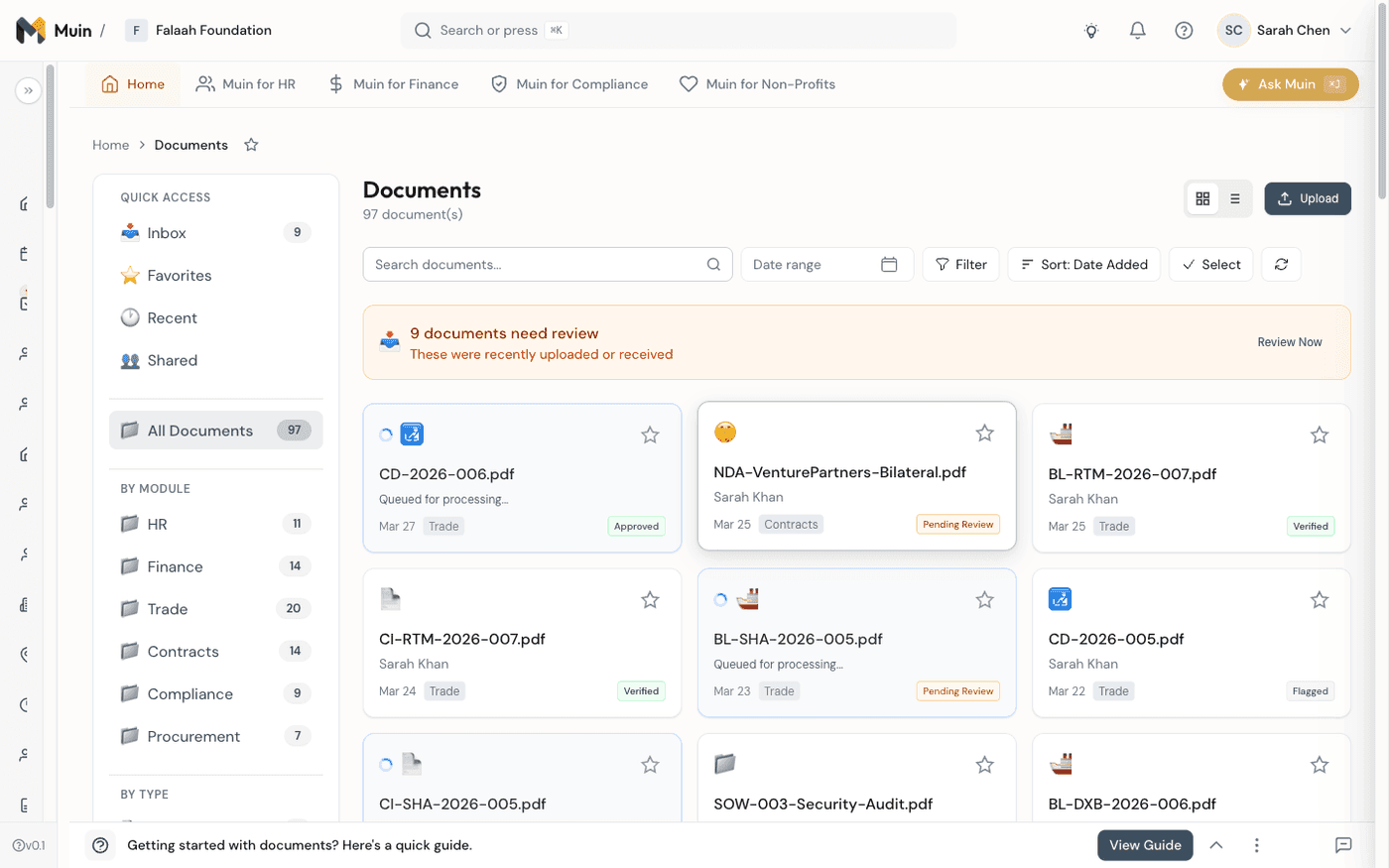
When you upload a document to Muin—whether it’s an invoice, contract, insurance certificate, or grant proposal—AI immediately goes to work reading and understanding it.
How It Works
The extraction pipeline combines multiple AI capabilities:
- OCR (Optical Character Recognition) handles scanned documents and images
- NLP (Natural Language Processing) understands context and meaning
- Entity extraction identifies key fields like dates, amounts, names, and addresses
- Document classification recognizes what type of document it is
Supported Document Types
Muin’s document intelligence handles:
- Financial documents: Invoices, receipts, purchase orders, W-9s, 1099s
- Contracts: Agreements, amendments, SOWs, NDAs
- Compliance documents: Insurance certificates, licenses, certifications
- HR documents: Offer letters, policies, I-9s, performance reviews
- Vendor documents: Proposals, RFPs, qualification packages
Confidence Scoring
Not all extractions are equal. Muin provides confidence scores for each extracted field, so you know when AI is certain and when human review might be needed. A clear, typed invoice might have 99% confidence. A faded fax of a contract might show 75%, flagging it for review.
Example: Invoice Processing
When you upload an invoice, Muin automatically extracts:
- Vendor name and address
- Invoice number and date
- Due date and payment terms
- Line items with descriptions, quantities, and amounts
- Total amount and tax breakdown
What used to require manual data entry—or expensive OCR software that still needed human cleanup—now happens automatically in seconds.
Stage 2: Classify & Organize
Extraction is just the beginning. Once AI understands what’s in your documents, it organizes them intelligently.
Auto-Categorization
Documents are automatically classified by type, module, and relevance. An insurance certificate goes to your vendor compliance folder. An invoice gets routed to accounts payable. A grant proposal lands in your grants module.
This isn’t just folder organization—it’s contextual placement that makes documents findable across your entire organization.
Smart Tagging
Beyond basic categories, AI adds semantic tags based on document content:
- A contract mentioning “12-month term” gets tagged with the expiration date
- A vendor document from Texas gets geographic tags
- A compliance certificate gets tagged with the regulatory framework it addresses
Cross-Module Visibility
The real power emerges when documents connect across modules. When you’re reviewing a vendor, you see their:
- Original contract and any amendments
- Insurance certificates (with expiration alerts)
- Invoices and payment history
- Performance notes and communications
All automatically linked, no manual filing required.
Stage 3: Search & Retrieve
Having organized documents is useless if you can’t find what you need. Muin’s retrieval goes far beyond keyword search.
Natural Language Queries
Ask questions the way you’d ask a colleague:
- “Find all invoices from Texas Steel over $10,000”
- “What are the payment terms in the ABC Corp contract?”
- “Show me all insurance certificates expiring in the next 30 days”
- “When does our lease with Main Street Properties end?”
RAG-Powered Answers
Muin uses Retrieval-Augmented Generation (RAG) to not just find documents, but answer questions from them. Instead of returning a list of files to read through, you get direct answers with citations.
Question: “What is our liability limit with Texas Steel?”
Answer: “Your liability limit with Texas Steel is $2,000,000 per occurrence and $4,000,000 aggregate, as specified in Section 5.2 of the Master Services Agreement dated January 15, 2024.”
The source document is linked, so you can verify and dig deeper if needed.
Cross-Reference Intelligence
Because Muin understands relationships between documents, it can answer questions that span multiple sources:
“Which vendors have expiring certifications and outstanding invoices?”
This query touches compliance documents, certification tracking, and accounts payable—impossible to answer without unified document intelligence.
Stage 4: Create & Assemble
Here’s where document intelligence takes a leap beyond traditional document management. Muin doesn’t just read documents—it helps you create them.
The Document Assembly Engine
Creating professional documents—grant proposals, RFP responses, compliance reports, contracts—traditionally requires starting from scratch or copy-pasting from old documents. Both approaches are time-consuming and error-prone.
Muin ships more than 30 built-in document types spanning HR, legal, finance, and nonprofit work — from grant proposals and RFP responses to NDAs, offer letters, board resolutions, and compliance reports — each with its own guided structure.
The Document Assembly Engine changes this with five key capabilities:
1. Adaptive Interview Engine
Instead of facing a blank page, you answer guided questions. The AI adapts based on your responses—skipping irrelevant sections, diving deeper where needed.
For a grant proposal, the interview might cover:
- Grant opportunity details
- Problem statement and needs assessment
- Project design and methodology
- Budget and timeline
- Organizational capacity
The questions adapt based on the funder (federal vs. foundation), project type (program vs. capital), and your organization’s profile.
2. Context Gathering
This is where document intelligence shines. Instead of retyping information that already exists in your organization, the AI gathers context from:
- Data Vault: Your organization profile, staff bios, mission statement
- Past documents: Previous proposals, successful grants, boilerplate language
- External sources: Grant requirements, funder priorities, regulatory frameworks
- Linked records: Relevant contacts, projects, and financial data
You’re not starting from zero—you’re building on everything your organization already knows.
3. AI Section Generation
With interview responses and gathered context, AI generates each section of your document. A grant proposal’s “Organizational Background” section draws from your mission statement, annual reports, and past successful language. The budget narrative references actual financial data.
The writing is professional, contextual, and tailored to the specific document type and audience.
4. Iterative Refinement
AI-generated content is a starting point, not the final product. You review each section, provide feedback, and the AI revises:
- “Make this section more concise”
- “Add more detail about our previous project outcomes”
- “Adjust the tone to be more formal”
This feedback loop continues until each section meets your standards.
5. Export Anywhere
When your document is ready, export to:
- Microsoft Word for final editing and formatting
- PDF for submission and distribution
- Custom templates matching your organization’s branding
Use Cases: Read vs. Create
Document intelligence serves two complementary purposes across every document type:
| Document Type | Read & Extract | Create & Assemble |
|---|---|---|
| Grant Proposals | Extract funder requirements, eligibility criteria, deadlines | Generate full proposals from interviews and context |
| Invoices | Extract vendor, amounts, line items, due dates | Generate invoices from purchase orders and delivery records |
| Contracts | Extract terms, obligations, key dates, parties | Draft contracts from templates with customized terms |
| RFP Responses | Parse RFP requirements section by section | Generate tailored responses addressing each requirement |
| Compliance Reports | Extract audit findings, certifications, gaps | Generate narrative reports with evidence and action items |
| Policy Documents | Extract policy terms, requirements, effective dates | Draft policies incorporating regulatory requirements |
The complete lifecycle means documents flow both directions: information comes in through extraction and goes out through creation.
Documents You Should Never Write From Scratch Again
The Create stage earns its keep on a specific class of documents — the ones where most of what you need already exists in past documents, data systems, and people’s heads, yet teams open a blank page anyway. Five stand out:
- Grant proposals — Organizational background, staff credentials, and program data carry across every application. The interview asks for the core insight (“What community need does this address?”); AI expands it into a funder-ready narrative in your organization’s voice.
- RFP responses — Essentially long-form answers to structured questions. AI parses each requirement, maps it to a response section, and pulls relevant past work and case studies — so tailored responses replace the obviously-recycled ones evaluators notice.
- Compliance reports — Predictable structures (SOC 2 controls, grant report sections, regulatory filings). AI pre-populates from data, flags missing sections before submission, and turns evidence into narrative.
- Contracts and agreements — Most contract creation is assembly, not legal drafting. AI starts from your legal team’s approved clause library, customizes scope and terms from guided questions, and flags non-standard terms for review — so legal review focuses on negotiated terms, not boilerplate. Deals stall when contracts take too long; a professional first draft in hours keeps them moving.
- Policy documents — Handbooks and security policies that get updated far less often than they should, because updating them is a project. When AI blends regulatory frameworks with how you actually operate, policies become living documents instead of one-time efforts.
The pattern is the same in every case: context + structure + AI. You provide the insight, direction, and judgment; AI handles the gathering and the first-draft writing. Starting from a blank page is a choice to ignore what your organization already knows.
Why Complete Lifecycle Matters
Most document tools do one thing well. OCR tools extract. Search tools find. Templates help you create. But they don’t connect.
When extraction feeds organization, which enables retrieval, which powers creation—that’s when document intelligence transforms operations:
Time Savings
- Invoice processing: Minutes instead of hours
- Document search: Seconds instead of hunting through folders
- Proposal creation: Days instead of weeks
Quality Improvement
- Consistent data extraction across all documents
- Context-aware writing that draws on organizational knowledge
- Reduced copy-paste errors and outdated information
Compliance Confidence
- Automatic expiration tracking and alerts
- Complete audit trails for every document
- Cross-referenced compliance across vendors and projects
Institutional Knowledge
- Documents become searchable organizational memory
- Past work informs future creation
- Expertise captured and reusable
Privacy & Security
Document intelligence requires AI to read and understand your most sensitive business documents. At Muin, we built privacy into the foundation:
All AI processing happens on our secure infrastructure. Your documents are never sent to third-party AI providers. No OpenAI, no Google, no external APIs touching your data.
This isn’t just a privacy feature—it’s a compliance requirement. Whether you’re working toward SOC 2, handling HIPAA-covered information, or simply keeping client data confidential, Muin’s architecture supports your obligations.
Getting Started
Document intelligence is part of Muin. Here’s how you’ll experience the complete lifecycle:
- Upload a few documents — Start with invoices or contracts
- Watch extraction in action — See AI pull out key fields
- Try natural language search — Ask questions about your documents
- Create a document — Start a new grant proposal or RFP response
- Experience the flow — From existing knowledge to new creation
The complete lifecycle transforms documents from administrative burden to organizational asset. Your documents stop being things you have to manage and start being things that work for you.
Related Reading
- Document Assembly documentation — Building documents from guided interviews and templates
- Document Processing documentation — How AI extraction and classification work
- Muin’s AI Agents, Explained — The agents that read, draft, and act on your documents
Ready to see document intelligence in action? Start your free trial or schedule a demo to see the complete lifecycle firsthand.