
Muin Agents Explained: Your Workflows, Running On Their Own Schedule
Discover how Muin's AI agents run your workflows on a schedule, an event, or a document arriving — processing documents, monitoring compliance, assessing risk, and queueing what needs your approval.

The difference between fragile automation and robust automation usually comes down to how well it handles variability. Most business processes aren’t as standardized as we like to think.
That’s why we built AI agents the way we did. Not as rigid rule-followers, but as systems that understand context and can adapt—while still knowing when to ask for help.
The timing is right: according to McKinsey’s 2025 State of AI report, 23% of organizations are already scaling AI agent systems, with another 39% actively experimenting. Industry analysts expect AI agents to become a standard feature in enterprise applications.
What Are AI Agents?
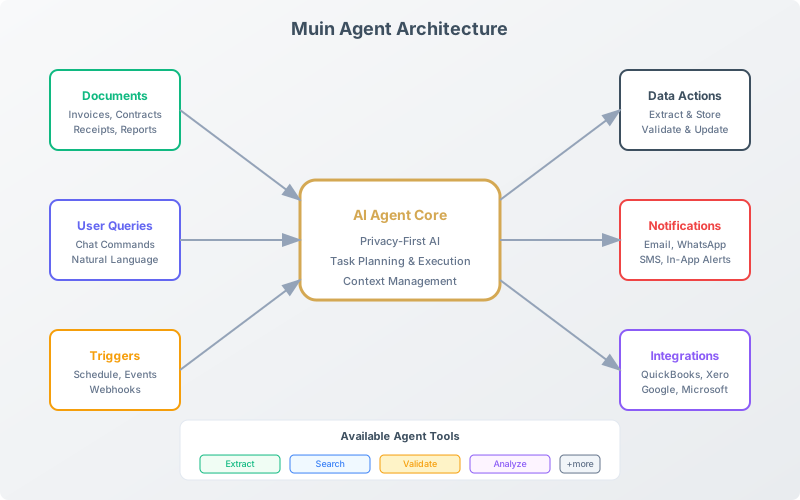
AI agents are autonomous software programs that can:
- Perceive — Understand documents, data, and situations
- Decide — Make judgments based on rules and context
- Act — Execute tasks and trigger workflows
- Adapt — Adjust to your preferences and corrections over time
Unlike simple automation (if X, then Y), agents handle variability. They can process invoices that look completely different from each other, flag unusual situations for human review, and adapt to your specific business context.
How Agents Differ from Simple Automation
| Traditional Automation | AI Agents |
|---|---|
| Follows exact rules | Understands intent |
| Breaks on variations | Handles variability |
| One task only | Multi-step reasoning |
| Predefined inputs | Any document format |
| Manual updates | Adapts to corrections and preferences |
Example: A traditional invoice scanner needs invoices in a specific format. An AI agent understands what an invoice IS and can extract information regardless of layout, vendor, or format.
This matters for business outcomes. Industry research suggests that intelligent document processing can deliver up to 35% cost savings and a 17% reduction in document-related work for organizations that adopt it—though actual results vary based on implementation and document volumes. The key difference from traditional automation: agents adapt to your corrections and preferences rather than requiring constant rule updates.
The Muin Agent Library
Muin ships with a growing library of pre-built agents across 8 modules: Document Intelligence, Finance, HR, Vendors, CRM, Nonprofit, Compliance, and General (15 are live today). Here are some of the key ones.
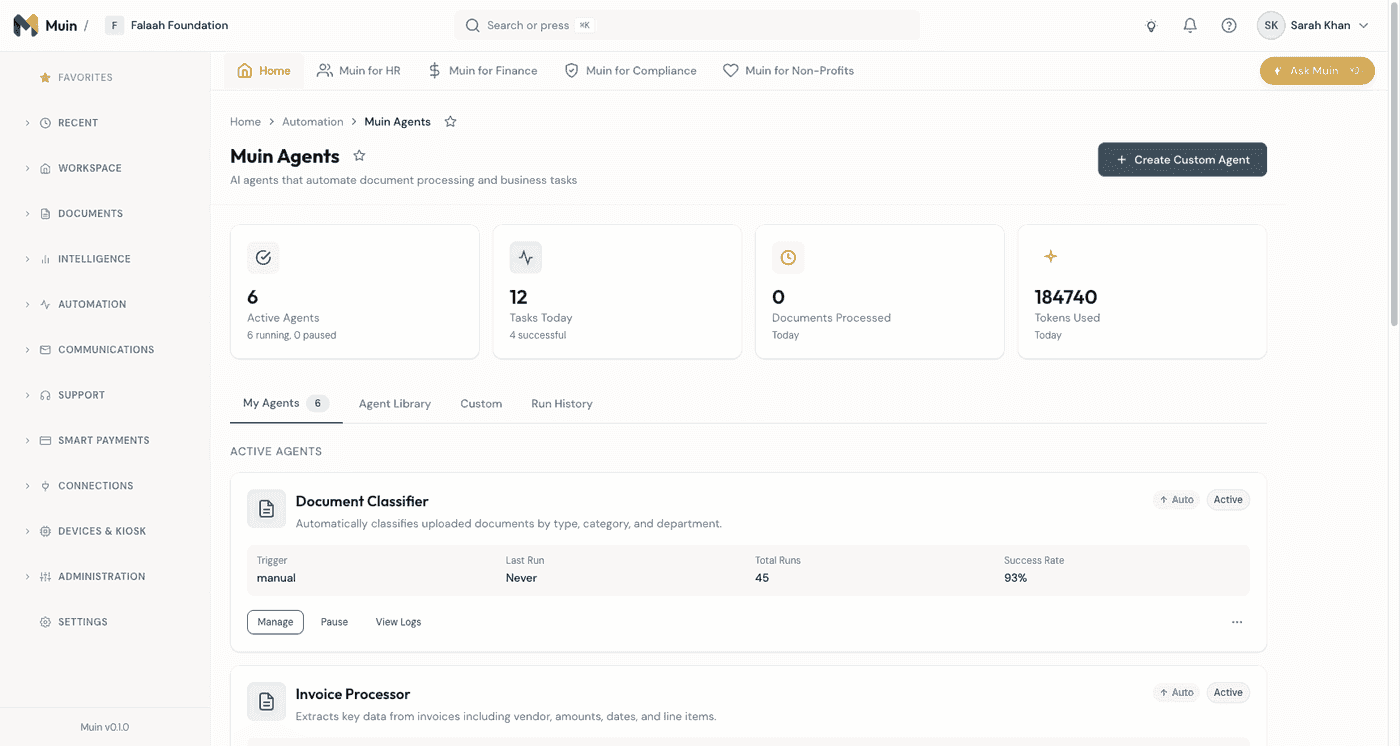
Platform Agents
These agents form the foundation — they run across all modules and handle common document operations.
| Agent | What It Does |
|---|---|
| Document Classifier | Automatically identifies document type (invoice, contract, receipt, W-9, insurance cert, and 20+ more) with confidence scoring. Routes documents to the right module. |
| Auto Summarize | Generates concise summaries of uploaded documents, extracting key points and action items. |
| Smart Reminder | Creates intelligent reminders based on document content — due dates, renewal deadlines, follow-up items. |
| Report Generator | Compiles data from documents and agent runs into structured Markdown reports with narrative summaries. Supports operations, financial, compliance, vendor scorecard, and custom report types. |
Finance Agents
The most active category — these agents handle the documents that keep your business running.
| Agent | What It Does |
|---|---|
| Invoice Processor | Extracts vendor, amount, date, line items. Matches to existing vendor records. Validates mathematical accuracy. Applies GL coding based on patterns. Handles multi-page invoices, handwritten amounts, multiple currencies. |
| Receipt Scanner | Processes receipts from any source — photographed, emailed, or uploaded. Extracts merchant, amount, date, and category. |
| Expense Categorization | Reviews expenses and assigns appropriate categories. Checks against policy limits. Flags potential policy violations. Adapts to your corrections. |
| Insurance Cert Processor | Verifies insurance certificates automatically — extracts coverage types, limits, effective dates, and named insureds. |
| W-9 Processor | Extracts and validates vendor tax forms — TIN, business name, entity type, and exemptions. |
| Duplicate Payment Guardian | Catches duplicate invoices before they reach approval. Compares new invoices against recent history using vendor name, invoice number, and amount matching with configurable similarity thresholds. |
Compliance Agents
Compliance obligations arrive on their own schedule. These agents run on one too.
| Agent | What It Does |
|---|---|
| Compliance Checker | Validates documents against regulatory requirements and internal policies. Flags gaps and generates compliance reports. |
| Expiration Monitor | Tracks certification, license, and insurance expirations across all vendors and employees. Triggers renewal workflows before deadlines. |
| Regulatory Monitor | Watches for regulatory changes relevant to your business and alerts when action is needed. |
Contract Agents
| Agent | What It Does |
|---|---|
| Contract Analyzer | Extracts key terms and dates. Identifies obligations and deadlines. Flags unusual clauses. Compares against standard terms. Tracks renewal and termination dates. |
Analysis includes: Payment terms, liability clauses, auto-renewal provisions, termination rights, and compliance requirements.
HR Agents
| Agent | What It Does |
|---|---|
| Employee Onboarder | Processes new hire paperwork, validates required documents, and tracks onboarding completion status. |
Nonprofit & Grant Agents
This is one of Muin’s strongest areas — a full suite of agents purpose-built for nonprofit organizations.
| Agent | What It Does |
|---|---|
| Grant Matcher | Analyzes your organization’s profile and matches it against available grant opportunities. Scores fit and highlights requirements. |
| Grant Recommender | Goes beyond matching — provides strategic recommendations on which grants to pursue based on your capacity, history, and alignment. |
| Donor Analyst | Analyzes donor giving patterns, identifies trends, and surfaces engagement opportunities. |
| Fund Health Monitor | Tracks fund balances, burn rates, and restricted vs. unrestricted allocations. Alerts when funds are at risk. |
| 990 Prep Agent | Assists with IRS Form 990 preparation — classifies expenses, maps to 990 categories, and identifies potential reporting issues. |
| Grant Alert | Monitors for new grant opportunities matching your criteria and sends timely notifications. |
Vendor Agents
| Agent | What It Does |
|---|---|
| Vendor Risk Assessor | Calculates vendor risk scores based on documents, payment history, and compliance status. Monitors for risk indicator changes. |
| Vendor Document Processor | Validates vendor-submitted documents — business registration, insurance, licenses, tax forms. Compares submitted documents against claims. |
Custom Agents
Need something specific to your business? Muin includes a Custom Prompt Agent that lets you define your own agent logic using natural language.
- Define what the agent should analyze
- Set the output format you need
- Configure triggers and schedules
- Run against any document or data set
Custom agents have full access to the same infrastructure as built-in agents — confidence scoring, audit trails, workflow integration, and human review routing.
What Makes Muin Agents Different
Most platforms have some form of AI automation. Here’s what sets Muin’s agent system apart:
Full Audit Trail Every agent run is logged with the decisions made, confidence scores, tokens used, and time taken. You can trace exactly why an agent flagged something or what data it extracted.
Agent Versioning Agent definitions go through a lifecycle: draft, published, deprecated, archived. You can update agent behavior without disrupting running workflows, and roll back if needed.
Tenant-Specific Configuration Each organization gets its own agent configuration — thresholds, match fields, notification preferences, and approval rules. Agents adapt to your business, not the other way around.
Usage Tracking & Quotas Every agent call tracks token usage against your plan’s quota. No surprise bills — you can see exactly what each agent costs and set limits.
Admin Controls Administrators can override prompts, adjust confidence thresholds, and emergency-block any agent — all without deploying code.
Insights Engine Beyond individual agents, Muin’s Insights system aggregates patterns across agent runs to surface anomalies, trends, and actionable intelligence — like unusual expense patterns, compliance risks, or process bottlenecks.
How Agents Work
Triggering Agents
Agents can start in three ways:
1. Event-Based (Automatic) Something happens, an agent runs.
- Document uploaded → Document Classifier + relevant processor
- Vendor created → Vendor Document Processor
- Expense submitted → Expense Categorization Agent
- Invoice processed → Duplicate Payment Guardian
2. Scheduled Time-based execution.
- Daily: Compliance Checker, Expiration Monitor
- Weekly: Vendor Risk Assessor, Fund Health Monitor
- Monthly: Report Generator, 990 Prep Agent
3. Manual You decide when to run.
- Re-process a batch of documents
- Force a compliance check
- Generate an ad-hoc report
- Run a custom agent against selected data
Agent Execution
When an agent runs:
- Input — Agent receives documents or data
- Analysis — AI processes and understands the content
- Decision — Agent applies rules and judgment
- Action — Results are saved, workflows triggered
- Logging — Full audit trail recorded
Monitoring Results
After agents run, review results in:
Agent Dashboard
- Run history with timestamps
- Success/failure rates
- Items processed
- Exceptions flagged
Detailed Run Log
- Each item processed
- Decisions made
- Confidence scores
- Flagged items
Notifications
- Completion confirmations
- Exception alerts
- Summary emails
Agent Use Cases by Module
Finance Module
| Agent | Use Case |
|---|---|
| Invoice Processor | Process incoming invoices automatically |
| Duplicate Payment Guardian | Catch duplicate invoices before approval |
| Expense Categorization | Review and code submitted expenses |
| Receipt Scanner | Process receipts from any source |
| Report Generator | Daily cash flow, monthly close reports |
| Insurance Cert Processor | Verify insurance certificates automatically |
| W-9 Processor | Extract and validate vendor tax forms |
HR Module
| Agent | Use Case |
|---|---|
| Employee Onboarder | Process new hire paperwork |
| Expiration Monitor | Track certification expirations |
| Report Generator | Headcount, compliance status |
Vendors Module
| Agent | Use Case |
|---|---|
| Vendor Document Processor | Validate new vendor documents |
| Vendor Risk Assessor | Calculate and update risk scores |
| Expiration Monitor | Insurance and certification tracking |
| Contract Analyzer | Extract terms from vendor contracts |
Nonprofit Module
| Agent | Use Case |
|---|---|
| Grant Matcher | Find grants that fit your organization |
| Grant Recommender | Get strategic grant pursuit recommendations |
| Donor Analyst | Understand donor patterns and trends |
| Fund Health Monitor | Track fund balances and burn rates |
| 990 Prep Agent | Prepare for IRS Form 990 filing |
| Grant Alert | Get notified of new grant opportunities |
Configuring Agent Behavior
While agents work out of the box, you can customize them:
Thresholds and Rules
Example: Invoice Processor
- Auto-approve invoices under $500
- Require review for invoices over $5,000
- Flag duplicate detection within 30 days
- Reject invoices missing required fields
Example: Duplicate Payment Guardian
- Set similarity threshold (default 85%)
- Configure lookback period (default 90 days)
- Adjust amount tolerance (default 1%)
- Choose which fields to compare
Notification Preferences
- Who gets notified of results
- Which exceptions trigger alerts
- Summary frequency (real-time, daily, weekly)
- Escalation paths
Approval Requirements
- Which agent actions need human approval
- Confidence thresholds for auto-processing
- Review queues and assignments
Best Practices for Using Agents
1. Start with Pre-Built Agents
Don’t try to customize everything immediately. Use the defaults to understand how agents work, then adjust based on your specific needs.
2. Monitor Before Fully Automating
Run agents in “suggest mode” first:
- Agent processes items
- Recommendations shown but not applied
- You review and approve
- Adjustments made based on feedback
After confidence is built, enable auto-processing.
3. Set Up Error Notifications
Agents can fail. Make sure you know when they do:
- Enable failure notifications
- Set up retry policies
- Monitor success rates
- Review flagged items regularly
4. Review Flagged Items Promptly
Agents flag uncertain items for a reason. A growing flag queue means:
- Training data may be needed
- Rules may need adjustment
- New document types encountered
5. Trust But Verify
Periodically audit agent decisions:
- Sample random processed items
- Check that categorizations are correct
- Verify extracted data accuracy
- Compare against manual processing
Agent Metrics and KPIs
Track these metrics to understand agent value:
Volume Metrics
- Items processed per day/week/month
- Processing time saved
- Cost per transaction
Quality Metrics
- Accuracy rate
- Human correction rate
- False positive rate (incorrect flags)
- False negative rate (missed issues)
Efficiency Metrics
- Average processing time
- Queue wait time
- Throughput capacity
Get Started with Agents
If you’re curious about how this works in practice, start your free trial. Upload a few documents and watch what the agents do with them. That’s the best way to understand the system—see it process something real.
The agents are powerful, but they’re also transparent. You can always see what they did and why. That was a deliberate design choice. Automation that operates in a black box is automation you can’t trust.
Related Reading
- Agents vs. Workflows: When to Use Each — How agents and workflows differ, and how to combine them
- Building Workflows Without Code — Visual workflow builder guide
- Why Privacy-First AI Matters — How we protect your data during AI processing
- Muin for Finance — See agents at work in invoice processing
- Introducing Muin — The full platform overview
- AI Agents Overview — Documentation for the agent library, triggers, and configuration
Part of our Platform Features Series. Next up: Building Workflows Without Code