
How to reconcile 500+ donations a month without a spreadsheet
A practical guide to multi-rail donation reconciliation for nonprofits — card, NFC, Zelle, check, ACH, and cash — with AI-assisted matching, confidence tiers, and auto-receipts.

Illustrative scenarios and figures are design targets, not measured outcomes from a specific customer.
Every non-profit executive director eventually runs into the same week. Month-end. The bookkeeper is on their third pass through QuickBooks. The development director is exporting a CSV from the donor CRM to match against it. Someone — usually the ED — has a sticky note with three numbers: the cash count from Friday prayers, the Zelle deposit on the 3rd, and a check that cleared but has no memo.
By the 15th, the books “close.” Or close enough.
This is the quiet tax on every mission-driven organization that accepts gifts through more than one channel. You already run programs on less than you need. You cannot also run finance ops like a bank’s back office.
Why reconciliation is actually hard
The word reconciliation makes it sound tidy. It’s not. A real reconciliation run is an identity problem wearing accounting clothes.
Every gift lands through its own channel: Stripe’s webhook fires for card and NFC transactions, your bank statement shows ACH and wire transfers with memo strings from the payer’s bank (not yours), Zelle posts with the donor’s bank nickname (which may or may not match what’s in your CRM), checks arrive with handwritten memos, and cash from Jumu’ah or Sunday service is a count-and-bag operation before it hits the bank at all.
Each of those rails gives you some donor identifier. None of them give you the same one. The reconciliation is not “did the money come in?” — the reconciliation is “is the same person on Muin’s books, your CRM, the bank, Stripe, and the Zelle deposit the same person?”
The four traps
Nonprofits usually try to solve this with some combination of:
- One rail per tool. Stripe reconciles card. Bloomerang reconciles what you enter manually. QuickBooks reconciles the bank statement. The cross-rail reconciliation is a human holding it all together in their head.
- Weekly CSV exports and manual matching. The development team exports the Stripe transaction log. The bookkeeper exports the bank register. A staff member (usually the newest hire) spends half a day in a spreadsheet.
- Receipt-anyway policy. To avoid missing IRS §170 deadlines, some orgs auto-receipt every card transaction regardless of whether it matches a donor record — creating duplicate donor records, over-issued receipts, and a 990 headache in January.
- Punting cash. Because cash is hard, many orgs leave Jumu’ah collections, Sunday envelopes, and event cash in a “miscellaneous receipts” bucket and sort it out quarterly. Which means donor stewardship is one quarter behind.
None of these are wrong. They’re what you do when you don’t have time to solve the real problem. The real problem is that reconciliation has to be continuous, cross-rail, identity-aware, and auditable — four things a spreadsheet can’t be.
What Muin does differently
Muin’s Reconciliation Command Center is built around a single principle: every gift lands in the same review queue, regardless of rail. See the Donation Reconciliation documentation for how the queue, confidence tiers, and rail imports are set up.
That means a Jumu’ah cash envelope, a $50 Stripe donation, a $10,000 wire transfer, and a check that cleared on the 3rd of the month all appear on the same screen — each with its rail, its amount, its putative donor match, and a confidence score.
Four tiers govern what happens next:
- Auto-link — high confidence (exact name, email or phone, amount pattern consistent with prior gifts): matched silently, receipt generated, no staff action required.
- Flagged — borderline confidence: surfaces as a one-click confirm in the Command Center. Staff spends 2–3 seconds per row, not 2–3 minutes.
- Suggestion — possible match: offered as a hint with the donor record attached. Staff can accept, reject, or search for a different match.
- Guest record — low confidence: a new Person record is auto-created (marked as guest so duplicates can be merged later). The gift posts against that guest; staff resolves identity when time permits, often by correlating with an email or pledge a week later.
The key move is that nothing stalls the books. A low-confidence Zelle row still posts to the right fund in the ledger. The donor identity can be resolved later without holding up month-end close.
Best practice — capture donor intent before the gift arrives. The four tiers above describe what happens after a Zelle deposit or check lands. The bigger lever is upstream: get the donor to pledge first. A pledge form (or pledge giving page) attaches a memo code to the gift before it leaves the donor’s bank — when the deposit arrives, the matcher auto-links and the gift skips the flagged/guest queue entirely. Most of the manual cleanup work nonprofits do at month-end exists because pledges aren’t the default channel for offline gifts. Promote the pledge form on every donation portal, in event invites, and in your “how to give” page — see the next section for what the surface looks like.
The pledge form is a Smart Form: embed it on your site, send it in your year-end donor email, or link it from your event RSVPs. Donors fill out their identity, the fund they want to designate, and the gift amount — and walk away with a memo code to include on the Zelle transfer or check.
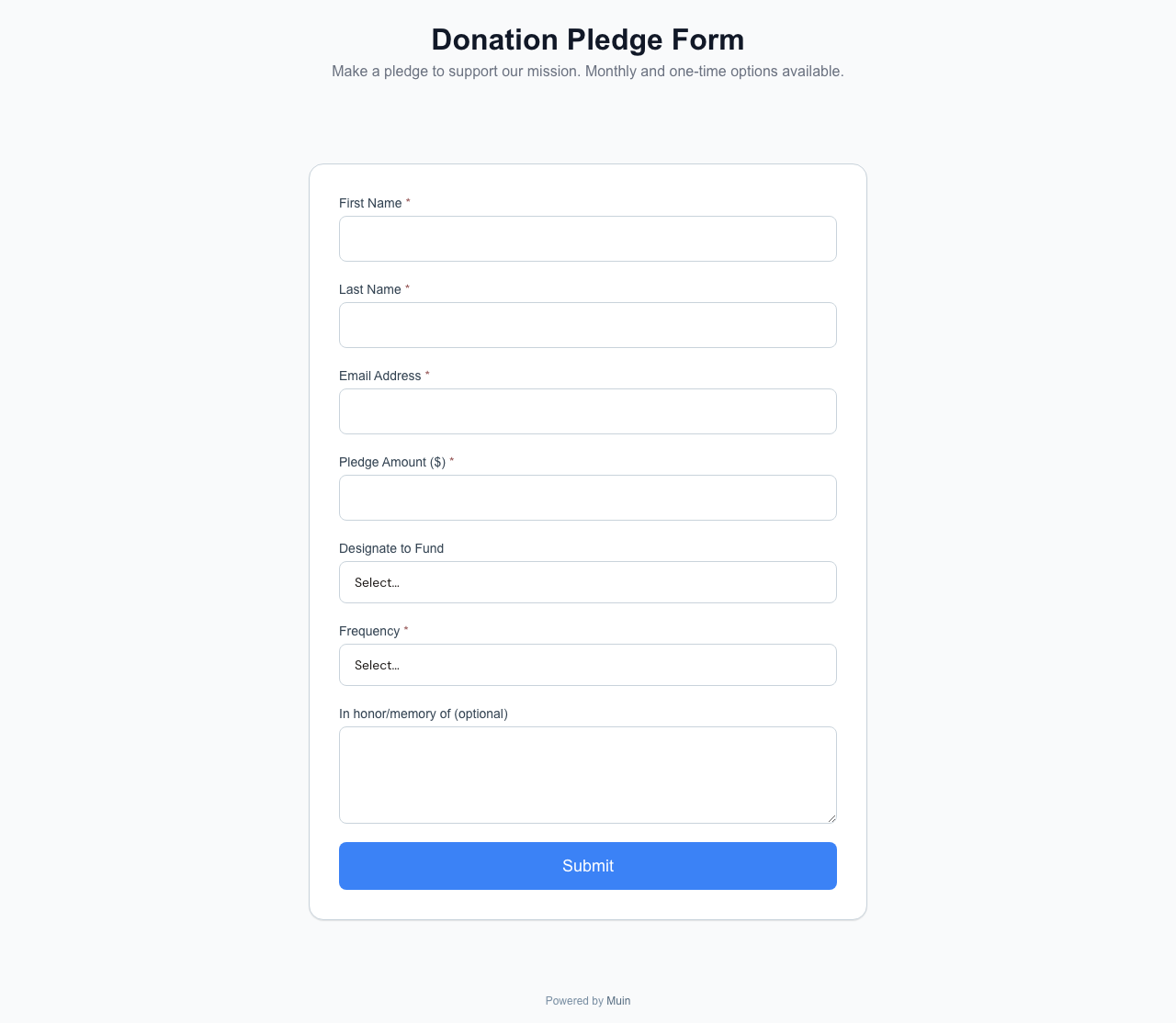
Pledge-first capture for offline rails
For organizations running named campaigns (Ramadan, Capital, year-end appeal), a pledge giving page is the campaign-themed alternative to the form: same memo-code mechanic, but rendered as a branded landing page with progress thermometer, suggested amounts, and impact copy.
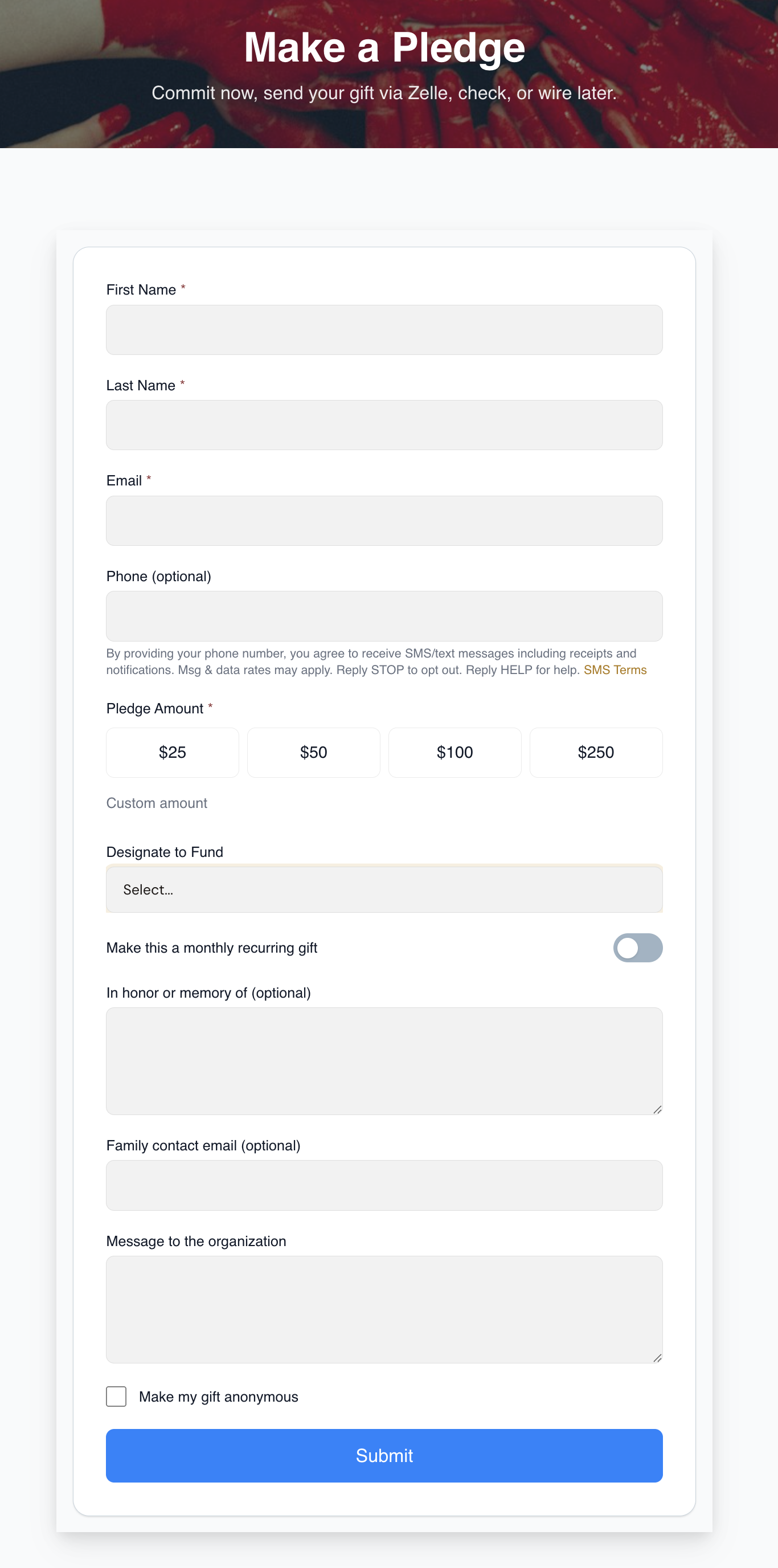
When the bank transaction lands, the matcher reads the memo code, links the deposit to the original pledge, and the gift posts auto-linked. No staff lookup. No “who is M. Hassan from a 04/14 Zelle deposit for $250?” The pledge already had the donor identity, fund designation, and amount.
Surface pledges aggressively: link the form from your “how to give” page, your event RSVPs, your year-end donor email, and your donor portal welcome screen. Every offline gift that arrives without a pledge is a future flagged or guest-record row to clean up.
What happens inside each rail
Each rail hands you a different donor identifier — which is why cross-rail matching is the hard part.
Card (Stripe). The easiest rail — the webhook fires the moment the charge succeeds with amount, timestamp, name, email, and the chosen fund. Muin attaches the fee-covering delta as a separate entry (so a donor’s $100 intent and the $102.90 payout both post correctly), and fires a dunning + donor-portal prompt when a recurring card expires — so a billing failure doesn’t masquerade as a “retention drop” next year.
Zelle. Looks easy, isn’t. Payments land as bank deposits with a memo the donor’s bank controls — the same person shows up as “JOHN SMITH,” “JOHN A SMITH,” and “J SMITH.” Muin fuzzy-matches on name similarity, amount pattern, frequency, and memo substring; high-confidence auto-links, borderline flags, ambiguous becomes a guest record.
Check. A photograph problem, not a data-entry problem. Snap each check on Muin Go at intake; OCR extracts check number, amount, payor, memo, and date into the same confidence tiers. When the deposit clears, the physical deposit reconciles against the sum of photographed checks — so the $500 check sitting in someone’s desk surfaces before it becomes a year-end emergency.
ACH / wire. Through Stripe Financial Connections the webhook carries full identity. From the bank statement it’s temporal: when an ACH row appears, Muin looks back five business days for a pledge, open invoice, or prior donor who typically gives this amount. Most unmatched ACH rows turn out to be employer-matching gifts cut under the employer’s name, not the donor’s.
A real walk-through
Consider a mid-size nonprofit — 180 gifts per month, five rails actively used.
On the first Monday of the month, the ED opens the Reconciliation Command Center. The queue shows:
- 94 card transactions from Stripe — 91 auto-linked (high confidence), 3 flagged (borderline email matches).
- 22 NFC transactions from QuickPay kiosks — 20 auto-linked via the kiosk’s donor-phone prompt, 2 guest records from the Friday prayer tablet where the donor declined to identify.
- 31 Zelle rows from the bank statement import — 18 auto-linked via memo name match, 8 flagged (name variants), 5 guest records.
- 17 checks — photographed on Muin Go at intake, OCR-extracted check number and amount — all 17 auto-linked because the donor had filed a pledge first. Zero staff lookup. Without pledges this would have been the slowest rail of the month.
- 16 cash envelopes from two Jumu’ah services — two-person count verified, deposit slip photographed, reconciled against the bank deposit when it cleared on the 7th.
The ED spends maybe 15 minutes on the 13 flagged items. The 7 guest records stay open for the development director to follow up — often by emailing the putative donor (“we received a $50 gift with your name, is that you?”).
By the end of the day, the books for October are closed. Not “close enough.” Closed.
Where receipts fit in
Tax receipts in Muin are tied to the match, not the transaction. That one distinction avoids the most common compliance risk at small nonprofits: over-issued receipts.
Auto-link high-confidence matches generate a receipt immediately. Flagged and suggestion tier matches generate a receipt only after confirmation. Guest records don’t trigger a receipt at all until the identity is resolved. The annual IRS §170 quid-pro-quo threshold is tracked per donor per year, and annual receipt summaries are available via the donor self-service portal — no manual January PDF scramble.
Because a receipt is tied to the gift rather than the rail, it can reach the donor however they gave: emailed, texted by SMS or WhatsApp, shown as a QR code, or printed on a thermal receipt at a kiosk. One receipt model spans every channel, and year-end statements collate a donor’s many gifts into a single document.
The month-end close shortcut
Traditional accounting cadence assumes a batch-oriented month-end close: wait until the bank statement posts, reconcile everything, then close the books. That cadence was built for a world where the only channel was check.
A multi-rail world requires continuous reconciliation. The bank statement is one input, not the only input. Card transactions are reconciled daily via Stripe webhook. NFC and QuickPay transactions are reconciled at the moment of tap. Checks are reconciled at photo capture. Zelle is reconciled on statement import. Cash is reconciled at bank deposit.
The result: the month-end close is a review, not a pile of work. Three business days instead of three weeks.
What this looks like in practice
The hardest part of switching to continuous multi-rail reconciliation isn’t the software. It’s changing the cadence your organization already has around month-end. Staff who spent three weeks getting the books closed are surprised to have nothing to do by the 5th. Development directors who used to chase the bookkeeper for “who gave $50 on the 3rd?” can now answer that question by looking at the donor profile.
It takes two or three full months to fully land. By the fourth month, the bookkeeper isn’t asking for the cash sheet from Friday prayers. The development director isn’t re-entering Stripe transactions. The ED isn’t the integration layer.
That’s the goal. Not faster data entry. No data entry.